 Hussain Mansoor
 In one of my previous posts, I’ve discussed the Cost aspect of adopting the cloud in Cloud is not for us. Cost is always the first factor I evaluate before I host anything. And it’s the same with all my customers to whom I provide Cloud Management services. One service that often stands out as unexpectedly expensive in the cloud is Email.
Emails are always trickier and following the cloud principles, reinventing this wheel is just not sensical! I would rather pay little bit extra to ignore this complexity and focus on my needs rather than managing tools and email eco-system. This is similar to why we have RDS vs Databases on EC2, ECS and EKS, etc. In this post, I will share a solution which works for POCs, individual projects or small organizations and might not work if you have 100 or more users. Given I prefer AWS, using emails from other providers though is possible but not a great solution. So, I’ll stick to AWS eco-system and try to use best practices and not rely on temporary kludge.
The solution from AWS for email inbox is Amazon Workmail, which uses Amazon SES in the background. For your custom domain, assuming it is managed on Route53, we create Organizations on Amazon Workmail. Once we have Organizations ready, we can create Users, Remote Users, Groups or Resources from the console.
- User with a mailbox / inbox. Has Send and Receive capability
- Remote Users are without a mailbox and are free
- Group is an email without an inbox and forwards emails to members (users) of the group. Again, Free and without mailbox
- Resources are non-human entities like room or equipment. Used for resource reservation purpose
We must create at least 1 user (with mailbox). This user will help us set up all the required configurations and glue Domain (Route53), Workmail, and SES together automatically by AWS. Once we have this working inbox, we’ll use the underlying SES to have unlimited email free inboxes 🥳. This solution enables us to create any number of free usernames and gives us ability to send emails from and receive emails to these usernames. But the catch is that there’s no inbox for each username. Emails received will be forwarded to one of the mailboxes and we’ll use gmail’s feature to send emails using our custom domain. This is obviously not feasible for large teams but is quite useful for small teams or individual projects.
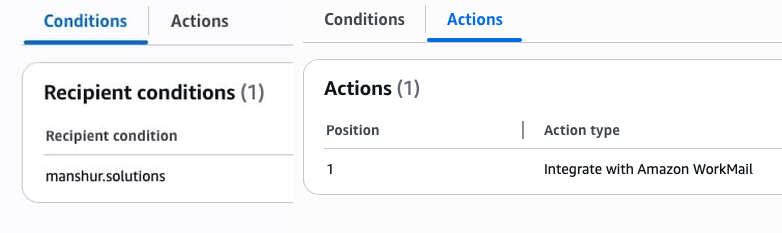
So, let’s begin. After the working mailbox is created, go to Amazon SES -> (left menu) Configuration -> Email receiving. You’ll see a rule set INBOUND_MAIL Active. This ruleset will have a rule with name like m-xx... and will show 2 things when clicked on. Conditions with the custom domain and Actions set to Integrate with Amazon Workmail.
After this follow these steps:
- Create a new Rule and name it
CatchAll-CUSTOM_DOMAIN - Under Conditions use the same
CUSTOM_DOMAIN - For Actions we’ll use Deliver to Amazon S3 bucket and Invoke AWS Lambda function.
- Make sure that this new rule is Below the original rule of Workmail (
m-xx...) - Create new S3 Bucket with a policy (sample below)
- Create IAM role for Lambda (sample below)
- Create Lambda function (sample below)
Replace all caps values with real values
S3 Bucket Policy
{
    "Version": "2012-10-17",
    "Statement": [
        {
            "Sid": "AllowSESSaves",
            "Effect": "Allow",
            "Principal": {
                "Service": "ses.amazonaws.com"
            },
            "Action": "s3:PutObject",
            "Resource": "arn:aws:s3:::BUCKET_NAME_HERE/*",
            "Condition": {
                "StringEquals": {
                    "aws:Referer": "ACCOUNT_NUMBER"
                }
            }
        }
    ]
}
IAM Role for Lambda
{
    "Version": "2012-10-17",
    "Statement": [
        {
            "Effect": "Allow",
            "Action": "logs:CreateLogGroup",
            "Resource": "arn:aws:logs:us-east-1:ACCOUNT_NUMBER:*"
        },
        {
            "Effect": "Allow",
            "Action": [
                "logs:CreateLogStream",
                "logs:PutLogEvents"
            ],
            "Resource": [
                "arn:aws:logs:us-east-1:ACCOUNT_NUMBER:log-group:/aws/lambda/LAMBDA_NAME_HERE:*"
            ]
        },
        {
            "Sid": "VisualEditor0",
            "Effect": "Allow",
            "Action": [
                "ses:SendEmail",
                "ses:SendRawEmail"
            ],
            "Resource": "*"
        },
        {
            "Effect": "Allow",
            "Resource": [
                "arn:aws:s3:::BUCKET_NAME_HERE/*"
            ],
            "Action": [
                "s3:GetObject"
            ]
        }
    ]
}
Python Code Lambda
We assume mailbox_email@CUSTOM_DOMAIN is the mailbox created in Amazon Workmail.
import boto3
import email
from botocore.exceptions import ClientError

def lambda_handler(event, context):
    s3 = boto3.client('s3')
    ses = boto3.client('ses')

    # 1. Matches the bucket you created
    BUCKET_NAME = "BUCKET_NAME_HERE"
    S3_PREFIX = "emails/"

    # 2. Email Settings
    TARGET_EMAIL = "mailbox_email@CUSTOM_DOMAIN"
    SOURCE_EMAIL = "forwarder@CUSTOM_DOMAIN" #this username can be anything

    try:
        ses_notification = event['Records'][0]['ses']
        message_id = ses_notification['mail']['messageId']
        object_key = f"{S3_PREFIX}{message_id}"

        # 1. Fetch the raw email from S3
        response = s3.get_object(Bucket=BUCKET_NAME, Key=object_key)
        raw_email = response['Body'].read()

        # 2. Parse email to get Subject/Sender
        msg = email.message_from_bytes(raw_email)
        original_subject = msg['subject'] or "(No Subject)"
        original_sender = msg['from'] or "Unknown"

        # Do not forward emails already addressed
        recipients = ses_notification['mail']['destination']
        if "mailbox_email@CUSTOM_DOMAIN" in recipients:
            return {'disposition': 'stop_rule_set'}

        # 3. Create a Forwarding Email
        new_subject = f"[Catch-All] {original_subject}"
        body_text = f"Forwarded from: {original_sender}\n\n--- Original Content ---\n\n"

        if msg.is_multipart():
            for part in msg.walk():
                if part.get_content_type() == "text/plain":
                    payload = part.get_payload(decode=True)
                    if payload:
                        body_text += payload.decode(errors='replace')
                    break # Only grab the first text part
        else:
            payload = msg.get_payload(decode=True)
            if payload:
                body_text += payload.decode(errors='replace')

        # 4. Send via SES
        ses.send_email(
            Source=SOURCE_EMAIL,
            Destination={'ToAddresses': [TARGET_EMAIL]},
            Message={
                'Subject': {'Data': new_subject},
                'Body': {'Text': {'Data': body_text}}
            },
            Tags=[{'Name': 'SESForwarded', 'Value': 'true'}]
        )
        print(f"Success: Forwarded email {message_id} to {TARGET_EMAIL}")

        return {'disposition': 'stop_rule_set'}

    except Exception as e:
        print(f"CRITICAL ERROR: {str(e)}")
        raise e
In our scenario, if the mailbox_email@CUSTOM_DOMAIN receives an email, it is handled by the 1st rule and email goes to inbox. For me, after Workmail rule, SES was triggering my catch-all rule resulting in duplication. To handle this, in the python code I’m specially checking for if "mailbox_email@CUSTOM_DOMAIN" in recipients: . This is to ignore the processing if email is meant to be for Workmail mailbox.
This manages the receiving part. Email for any username is saved in S3 and processed by lambda and forwarded to any email we want. What about sending part? Well, to send we can rely on gmail’s functionality of Send emails from a different address or alias. Gmail sends a verification email and since we can receive email for any username, we can easily verify any username to send emails. Gmail require SMTP Credentials which can be obtained from SES -> SMTP Settings -> Create SMTP credentials.
To make it look professional, create Remote Users for each email username. It will let you set First & Last name, Display name and let other users search it if you select Show in global address list checkbox. In the code, I’ve just checked for 1 mailbox only. If you have multiple mailboxes, you can get the live data from AWS SDK accordingly. CLI Command:
aws workmail list-organizations

aws workmail list-users --organization-id m-1234567890 --query 'Users[?State==`ENABLED`].{Username:Name,Email:Email}'
This approach isn’t scalable, but it works well in the early stages. Using a custom-domain email instantly makes a business look more legitimate and professional. And fall-back to Amazon Workmail from this solution is quite easy.
 What's in it for me?